
riddim n' ting
About
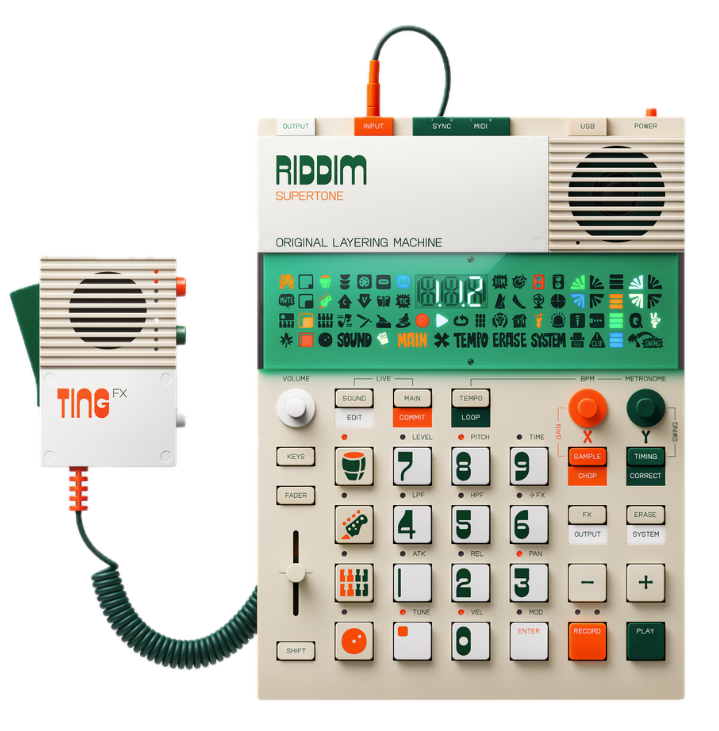
The Riddim N' Ting is a specialized evolution of the EP-series sampler (like the EP-133 K.O. II). It channels the energy of classic sound system culture, where the DJ (Selector) handles the music and the MC (Toaster) provides vocal energy. EP–40 RIDDIM: The Riddim unit is the groovebox, loaded with authentic sounds from iconic reggae producers, including punchy drums, deep basslines, classic chord stabs, and pressure-sensitive Dub Sirens. It features the new Supertone subtractive synth engine for crafting classic reggae bass and lead tones. EP–2350 TING: The Ting unit is the vocal effects powerhouse, a lo-fi by design microphone that connects directly to the Riddim's input. It features four adjustable voice effects (Echo, Spring Echo, Pixie, Robot) and four triggerable samples, making it an instrument for live vocal texture rather than just a simple mic.
What it's for
This system is explicitly designed for expressive live performance and on-the-go music production, especially for those who love reggae, dub, and dancehall. Producers & Beatmakers: Use the EP–40's 128MB of memory and 12 stereo/16 mono voices to sample your own sounds or use the huge pre-loaded library to quickly sketch out full, complex tracks and arrangements in the nine user-editable projects. Live Performers & DJs: The dedicated Live Mode, grid-synced loops, seven main FX, and twelve Punch-In™ Effects allow for real-time manipulation, echo throws, and sound-system-style flair. The TING mic provides an instant, easy way to add spontaneous vocal hype and unique texture to any set. Dub Enthusiasts: The focused sound palette and effects—like the pressure-sensitive Dub Sirens and dedicated delay/reverb—make creating authentic dub and sound clash style music intuitive and immediate.
How to use
The Riddim N' Ting is built to be played anywhere: it runs on 4x AAA batteries and has a built-in speaker. Build a Beat (EP–40 RIDDIM): Use the pressure-sensitive keys to tap in drum patterns, sequence basslines with the Supertone synth, and trigger one-shot samples. The four sound groups and Scene workflow let you build and switch between complex, multi-bar arrangements instantly. Add FX and Flavor: Use the assignable Multi-functional Fader to sweep delay times or filter frequency for classic dub effects. Hit the pads to activate the Punch-In™ FX 2.0 for percussive echoes and rhythmic glitches. Perform Vocals (EP–2350 TING): Plug the TING mic into the EP-40's audio input. Activate the mic with the handle switch, then press the orange button to cycle through the four live vocal effects. Press the white button to drop one of the four on-board samples (like an air horn or vocal shout) right into your mix. Resample & Evolve: Use the stereo input to sample external instruments or resample the entire mix (including TING's effects) back into a pad on the EP-40, creating custom loops to free up tracks for new layers.